
DNS SRV Configuration for Dimensions (2600Hz Kazoo)
Overview
Dimensions supports DNS SRV records for the following services:
- Crossbar REST
- Blackhole WebSocket
- SIP connections for Connect softphones (Desktop, Mobile & CRM)
- SIP connections for physical handsets provisioned through the Dimensions handset provisioning service
Requirements by Deployment Type
The required SRV records depend on how Dimensions is being used within your environment.
Voice-enabled Dimensions
Where the Dimensions handset provisioning service is in use, i.e. the deployment includes physical SIP handsets, all SRV records documented in this guide are required.
This ensures:
- Handsets can automatically discover the correct SIP, WebRTC, and signalling services
- Full platform functionality is available
- High availability and regional failover operate correctly across all services
In this scenario, Crossbar, Blackhole, SIP Connections and WebRTC SRV records must all be configured.
Client-only Deployments
If the handset provisioning service is not in use, depending on which elements of Dimensions are being used determins which SRV records are required.
Connect CRM / Connect WebRTC
- WebRTC SRV records are strictly required
Connect Desktop
- SIP Connections SRV records are strictly required
What is a DNS SRV Record?
A DNS SRV record is a type of DNS record used to define how and where a service can be reached on the network.
Unlike standard DNS records (such as A or CNAME records), which only map a name to an IP address, an SRV record also specifies:
- Which server provides the service
- Which port the service runs on
- The priority of each server
- The weighting used for load distribution
This allows clients to automatically discover the correct service endpoint without hard-coding server addresses or ports.
Dimensions uses SRV records to support high availability, regional failover, and load balancing across multiple servers.
By defining multiple SRV records for the same service:
- Clients can fail over automatically if a server becomes unavailable
- Traffic can be distributed across regions or nodes
- Services can be moved or scaled without reconfiguring clients
How an SRV Record Works
An SRV record is made up of the following components:
_service._protocol.domain. TTL IN SRV priority weight port targetField Breakdown
| Field | Description |
|---|---|
| Service | The name of the service (e.g. _blackhole,
_sip, _crossbar) |
| Protocol | The transport protocol (_tcp or
_udp) |
| Domain | The base domain used for all SRV records |
| Priority | Lower numbers are tried first |
| Weight | Used to distribute traffic between servers with the same priority |
| Port | The port the service is listening on |
| Target | The hostname of the server providing the service |
Example SRV Record
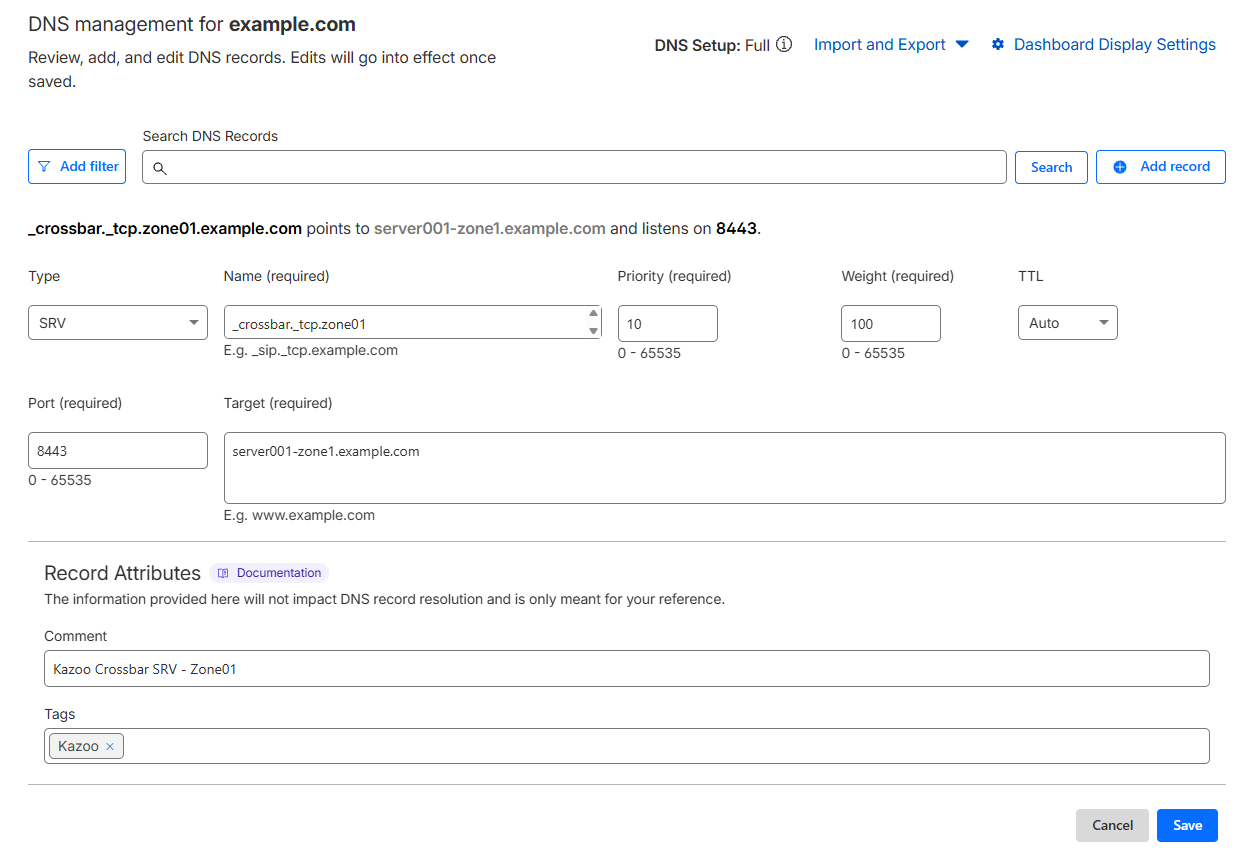
_crossbar._tcp.zone01.example.com. 1 IN SRV 10 100 8443 server001-zone1.example.com.In this example:
- Clients query
_crossbar._tcp.zone01.example.com - The service is provided on port
8443 - Priority
10is preferred over higher values - Weight
100is used when multiple records share the same priority
Below is an example of how this appears when configured in Cloudflare:
Example Usage
For testing and demonstration purposes, you can use the DNS SRV Checker to query the following example SRV records:
zone01.example.comzone02.example.com
These return example data only and do not represent live production results. They are provided to illustrate the expected request and response format when using the DNS SRV Checker against valid Dimensions SRV records.
Priority and Weight
SRV records use priority and weight to control failover and load balancing.
- Priority
- Determines the failover order
- Lower numbers are tried first
- Higher priority values are only used if lower ones are unavailable
- Weight
- Used to distribute traffic between servers with the same priority
- A higher weight increases the likelihood of a server being selected
- Weight is ignored if priorities differ
If a higher-priority server becomes unavailable, clients automatically try the next available priority group.
Dimensions SRV Records
The sections below describe the required SRV prefix formats for each Dimensions service.
Additional records can be added as required, depending on your infrastructure and redundancy requirements.
zone01.example.com).
Crossbar (REST API)
The Crossbar service provides the REST API interface used by applications, provisioning services, and platform integrations.
Required prefix
_crossbar._tcpExample SRV records
_crossbar._tcp.zone01.example.com.  1  IN  SRV  10 100 8443 server001-zone1.example.com.
_crossbar._tcp.zone01.example.com. 1 IN SRV 20 100 8443 server001-zone2.example.com.- Crossbar default port:
8443
The service hostname must match a Subject Alternative Name (SAN) on the certificate, wildcard SANs are supported.
For example, a certificate with a SAN of
*.example.com would be valid
for server01-zone01.example.com. If the service hostname does not match a SAN on the certificate, the connection will be rejected.
Blackhole (WebSocket)
The Blackhole service provides real-time WebSocket signalling used by Dimensions for events, presence, and call control.
Required prefix
_blackhole._tcpExample SRV records
_blackhole._tcp.zone01.example.com.  1  IN  SRV  10 100 2096 server001-zone1.example.com.
_blackhole._tcp.zone01.example.com. 1 IN SRV 20 100 2096 server001-zone2.example.com.- Blackhole default port:
2096
The service hostname must match a Subject Alternative Name (SAN) on the certificate, wildcard SANs are supported.
For example, a certificate with a SAN of
*.example.com would be valid
for server01-zone01.example.com. If the service hostname does not match a SAN on the certificate, the connection will be rejected.
SIP Connections
The following SRV records are only used by the following:
- Connect Desktop
- Physical Handsets provisioned through Dimensions
Different prefixes are used depending on transport and security requirements.
Secure SIP
Secure SIP connections use TLS over TCP.
Required prefix
_sips._tcpExample SRV records
_sips._tcp.zone01.example.com.    1  IN  SRV  10 100 7000 server001-zone1.example.com.
_sips._tcp.zone01.example.com. 1 IN SRV 20 100 7000 server001-zone2.example.com.- Secure SIP default port:
7000
The service hostname must match a Subject Alternative Name (SAN) on the certificate, wildcard SANs are supported.
For example, a certificate with a SAN of
*.example.com would be valid
for server01-zone01.example.com. If the service hostname does not match a SAN on the certificate, the connection will be rejected.
UDP / TCP
Required prefixes
_sip._tcp
_sip._udp
Example SRV records (TCP)
_sip._tcp.zone01.example.com.     1  IN  SRV  10 100 7000 server001-zone1.example.com.
_sip._tcp.zone01.example.com.     1  IN  SRV  20 100 7000 server001-zone2.example.com.
Example SRV records (UDP)
_sip._udp.zone01.example.com.     1  IN  SRV  10 100 7000 server001-zone1.example.com.
_sip._udp.zone01.example.com. 1 IN SRV 20 100 7000 server001-zone2.example.com.- SIP default port:
7000
WebRTC
WebRTC SRV records are used only by the following:
- Connect Web Edition
- Connect CRM
These clients do not use standard SIP
_sip or _sips SRV records.
Required prefix
_webrtc._tcpExample SRV records
_webrtc._tcp.zone01.example.com.  1  IN  SRV  10 100 5065 server001-zone1.example.com.
_webrtc._tcp.zone01.example.com. 1 IN SRV 20 100 5065 server001-zone2.example.com.- WebRTC default port:
5065
The service hostname must match a Subject Alternative Name (SAN) on the certificate, wildcard SANs are supported.
For example, a certificate with a SAN of
*.example.com would be valid
for server01-zone01.example.com. If the service hostname does not match a SAN on the certificate, the connection will be rejected.